
Why Is My LinkedIn Account Restricted? Common Causes and What to Do Next
Seeing a restriction notice when you try to use LinkedIn can be confusing, especially if the account worked normally the day before.
If you are asking, “Why is my LinkedIn account restricted?”, there is no single answer. LinkedIn can restrict an entire account, limit a single feature, request an identity check, or take action if its systems detect behavior that may violate its rules.
The useful first step is not to guess how long the restriction will last. It is to work out what probably triggered it.
Common causes include a sudden increase in activity, too many connection requests, prohibited automation, unwanted messages, misleading profile information, policy violations, or signs that someone else accessed the account.
This article focuses on those causes and the first things worth checking.
What Does a LinkedIn Account Restriction Mean?
A LinkedIn restriction means the platform has limited your ability to use some or all account functions.
The exact effect depends on the restriction.
You may find that you:
- cannot sign in;
- cannot send connection requests;
- cannot perform a certain action;
- must verify your identity;
- have limited access to account features; or
- have received a notice about a more serious account restriction.
LinkedIn states that violations of its Professional Community Policies can lead to action against content or accounts. Repeated or serious violations can result in account restrictions. LinkedIn may also restrict an account when it detects signs of compromise.
That distinction matters because a connection-request restriction is not the same problem as an identity check or a full account restriction.
First, Work Out What Type of Restriction You Have
Before trying to determine the cause, read the exact notice shown by LinkedIn.
Most restriction problems fall into a few broad groups.
Invitation or Feature Restriction
You may still be able to access LinkedIn, but lose the ability to send invitations or perform other specific actions.
LinkedIn says invitation restrictions can occur when members send many invitations in a short period, have many invitations ignored or left pending, receive spam reports, or appear to be using prohibited automation.
Temporary Account Restriction
Some restrictions affect more of the account for a limited period.
For example, LinkedIn says high volumes of messages, comments, posts, or other content in a short period may look automated or inauthentic and can lead to restricted access.
Identity or Security Restriction
LinkedIn may restrict access to confirm that the person using the account is the legitimate owner.
Its Help Center states that accounts may also be restricted when LinkedIn detects signs of compromise or takeover.
Serious or Permanent Restriction
LinkedIn can enforce its rules more strongly for serious or repeated violations. Its account restriction guidance states that certain serious violations may result in permanent restriction.
If you’re not sure which type of restriction you have, see our full guide to LinkedIn account restrictions.
Now, the more important question is what caused it.
1. Your Recent Activity Was Much Higher Than Normal
One of the first things to review is what you were doing shortly before the restriction appeared.
LinkedIn specifically states that high volumes of messages, comments, posts, or other content over a short period can appear to be automated or inauthentic activity. In such cases, LinkedIn may reduce content visibility or restrict an account.
This does not mean normal active use is prohibited.
The issue is the pattern of activity.
For example, ask yourself whether you recently:
- sent far more messages than usual;
- viewed or interacted with many profiles in one session;
- posted many comments within a short period;
- suddenly increased outreach activity;
- performed the same action repeatedly; or
- started using a new outreach or productivity workflow.
A sudden change can matter more than simply being an active LinkedIn user.
Do not assume there is a specific public number that guarantees safety. LinkedIn does not provide a universal safe limit for every type of account activity.
2. Your Connection Requests May Be the Cause
If you can use LinkedIn but cannot send invitations, connection behavior should be one of the first things you inspect.
According to LinkedIn, an invitation restriction can happen when:
- Many invitations are sent within a short time;
- many invitations remain pending;
- recipients ignore requests;
- recipients mark invitations as spam; or
- LinkedIn suspects automation.
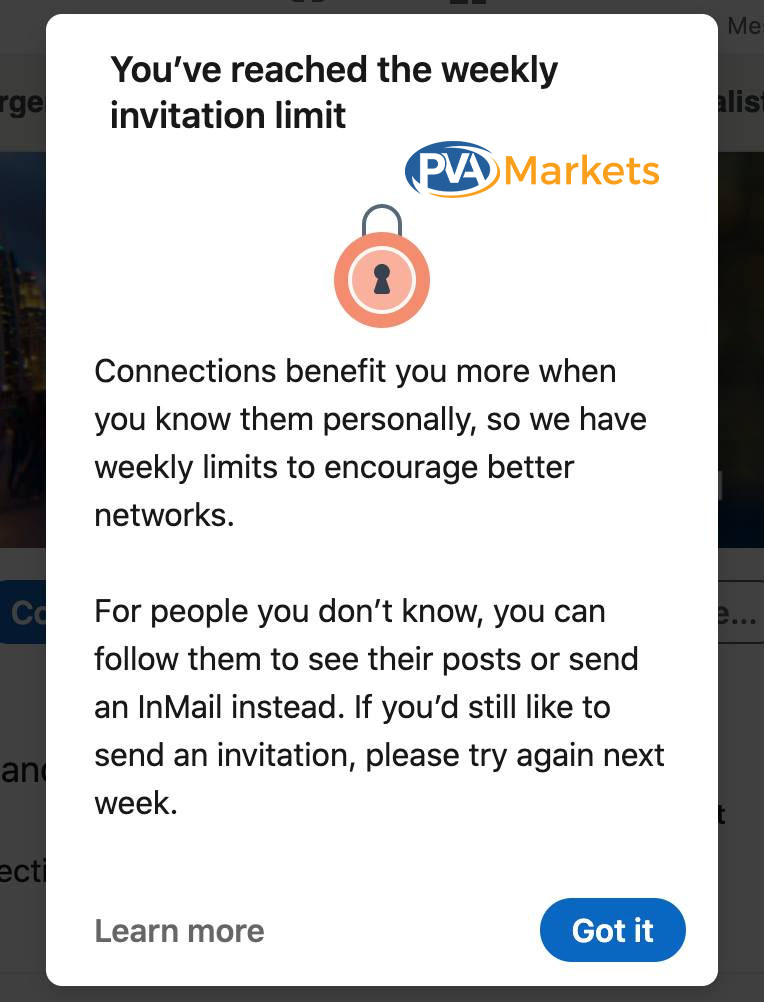
An invitation limit is different from a full LinkedIn account restriction. In this case, the member may still have access to LinkedIn but cannot continue sending connection requests until the restriction is removed.
This means the problem is not only the number of connection requests you send.
Recipient response matters too.
Imagine two users send a similar number of invitations.
One sends requests to former colleagues, customers, event contacts, and people within the same industry.
The other sends requests to a large number of unrelated users who have no reason to recognize the sender.
The second pattern is more likely to produce ignored invitations, pending requests, or spam reports.
That gives LinkedIn stronger signals that the outreach may be unwanted.
Do Not Rely on a “Safe Daily LinkedIn Limit”
You may find articles or social posts claiming that a certain number of connection requests per day is safe.
Treat those figures with caution.
LinkedIn documents its invitation limits and restrictions, but does not publish a universal daily limit that guarantees an account will avoid enforcement.
The more useful questions are:
- Are these people relevant to you?
- Are recipients accepting your requests?
- Are a large number of invitations pending?
- Has your invitation volume increased?
- Are you using software to send them?
Those factors tell you more than an unofficial daily quota.
3. A LinkedIn Automation Tool or Browser Extension May Be Involved
Automation is another common reason to investigate.
LinkedIn explicitly states that it does not allow third-party software or browser extensions that scrape data, automate activity, or modify LinkedIn’s website in prohibited ways.
Its User Agreement also prohibits unauthorized automated methods for accessing LinkedIn or for automating actions such as sending messages, adding contacts, commenting, liking, sharing, or driving artificial engagement.
This can include tools designed to automate tasks such as:
- connection requests;
- LinkedIn messages;
- profile visits;
- data collection;
- comments;
- likes;
- other repetitive LinkedIn actions.
If a restriction started soon after installing a browser extension, connecting an outreach tool, or increasing automated activity, that is an important clue.
“Human-Like” Automation Is Still Automation
A common mistake is assuming that an automation tool is acceptable if it introduces random delays or performs actions slowly.
That is not what LinkedIn’s policy says.
The relevant issue is whether the software performs prohibited automated activity, not whether the tool claims to imitate human behavior.
If automation appears to be involved, changing its delay settings does not fix the underlying policy issue.
4. LinkedIn May Have Detected Spam-Like Behavior
Spam on LinkedIn is broader than sending the same obvious advertisement to hundreds of users.
LinkedIn’s Professional Community Policies prohibit unwanted, irrelevant, unauthorized, inappropriate commercial, promotional, or repetitive messages and similar content. The policies also say members should not use invitations to spam people.
Look at your recent activity from the recipient’s point of view.
Possible warning signs include:
- sending the same unsolicited message to many users;
- Repeatedly contacting people who do not respond;
- using connection invitations mainly for promotion;
- leaving repetitive comments;
- publishing the same promotional message across discussions;
- generating engagement in an artificial way.
A message can be professionally written and still be unwanted.
For diagnosis, the important question is not simply, “Was my message legitimate?”
Ask instead:
Would the people receiving it reasonably expect or want this contact?
If many users ignore, report, or negatively respond to an outreach pattern, LinkedIn may interpret the activity differently from the sender.
5. Your Profile or Identity Information May Not Look Consistent
LinkedIn requires members to use their real identities and provide accurate information.
Its User Agreement requires accurate contact and identity information and states that members should use their real name. Its Professional Community Policies also prohibit fake profiles and misleading information about identity, employment, affiliations, qualifications, and achievements.
Identity-related issues can therefore become another reason for account restrictions.
Things worth checking include:
- whether your profile uses your real identity;
- whether your name is accurate;
- whether employment claims are genuine;
- whether your profile photo represents you;
- whether major profile information is misleading;
- whether information submitted during verification matches the account owner.
This does not mean every profile typo will cause a restriction.
The concern is false, deceptive, or materially inconsistent identity information.
6. LinkedIn May Be Trying to Protect a Compromised Account
A restriction does not always mean LinkedIn believes you intentionally violated a rule.
LinkedIn says it may proactively restrict an account when it detects signs that another person or entity has compromised or taken over the account.
That makes account security an important part of diagnosis.
Look for anything you do not recognize, such as:
- messages you did not send;
- invitations you did not create;
- unexpected profile edits;
- unfamiliar posts or comments;
- security emails you did not expect;
- password-reset messages you did not request.
If you see this type of activity, treat the restriction as a potential security issue rather than assuming it is due to your normal LinkedIn use.
LinkedIn may ask you to verify your identity before restoring access. Its current recovery process can use Persona and may request a government-issued ID and, in some cases, a photo to confirm identity. LinkedIn also lists alternative recovery methods for eligible situations.
7. Your Content or Behavior May Have Violated LinkedIn Policies
Restrictions can also result from violations unrelated to outreach volume.
LinkedIn’s Professional Community Policies cover authenticity, safety, spam, harassment, scams, misleading information, and professional conduct.
LinkedIn states that repeated or serious violations can lead to account restrictions.
If the restriction appeared after a particular post, comment, message, profile change, or interaction, review that activity against the policies rather than assuming the problem came from connection requests.
The context matters.
For example, an account with little outbound networking activity is unlikely to correctly diagnose an enforcement issue by focusing only on invitation limits if the restriction resulted from a policy-related content incident.
How to Narrow Down the Most Likely Cause
You may not always receive a detailed explanation of exactly which action triggered LinkedIn’s systems.
You can still narrow the possibilities by looking at what happened immediately before the restriction.
| What happened before the restriction? | What to investigate first |
| Sent many connection requests | Invitation activity, pending requests, recipient response |
| Started using a new LinkedIn tool | Automation or browser extensions |
| Sent a large batch of similar messages | Spam or high-volume activity |
| Suddenly increased comments or posts | High-volume or inauthentic activity signals |
| Changed important identity information | Profile accuracy or identity verification |
| Saw activity you did not perform | Possible account compromise |
| Received a policy notice | Professional Community Policies or User Agreement |
| Only invitations stopped working | Invitation-specific restriction rather than full account restriction |
This is not a definitive diagnostic test. LinkedIn controls its enforcement systems and may consider signals that users cannot see.
The table helps you start with the most relevant explanation rather than trying random fixes.
What Should You Do First?
Once you have an idea of what caused the restriction, keep your first response simple.
Read the Exact LinkedIn Notice
Do not rely on screenshots from another person’s account.
Check what LinkedIn tells you.
Look for whether:
- Only one feature is affected;
- Your whole account is restricted;
- LinkedIn asks for verification;
- a specific activity is mentioned;
- LinkedIn provides an on-screen review process.
The correct next step depends on that message.
Stop the Suspected Trigger
If you were sending large numbers of invitations, stop.
If you recently enabled automation, disable it.
If you were sending repetitive messages, stop that campaign.
If you suspect an account takeover, secure the account.
Do not continue the same activity while trying to determine what happened.
Check Your Tools and Browser Extensions
Review anything that interacts with LinkedIn.
LinkedIn’s own guidance for restrictions related to automated activity tells members to review and disable software or extensions that automate LinkedIn activity.
Do not focus only on obvious “LinkedIn bots.” A browser extension or external application may also interact with the site.
Follow LinkedIn’s Own Verification Instructions
If LinkedIn asks you to confirm your identity, follow the process it provides.
Do not submit identity information to random third-party sites claiming they can remove a restriction.
LinkedIn’s official Help Center explains the identity verification options used for account recovery.
What Can Make a LinkedIn Restriction Worse?
Some responses create more problems than they solve.
Continuing the Same Activity
If a restriction follows unusually high activity, continuing the same behavior after access returns does not address the cause.
LinkedIn states that repeated temporary restrictions related to high-volume activity can lead to stronger enforcement.
Trying More Automation
Do not respond to an automation-related restriction by searching for a tool that claims to be harder to detect.
That does not change LinkedIn’s rules on unauthorized automation.
Creating False Identity Information
Changing names, employment details, profile photos, or other identity information to get around verification can create an additional policy issue.
LinkedIn requires accurate identity information.
Sending Repeated or Unfounded Appeals
LinkedIn’s User Agreement prohibits misuse of its reporting and appeals processes, including duplicative, fraudulent, or unfounded submissions.
Use the official process and provide accurate information.
Assuming Someone Else’s Restriction Is Identical to Yours
A person who cannot send invitations may be subject to a different enforcement mechanism than someone who cannot sign in at all.
Advice only makes sense when it matches the type and likely cause of your restriction.
The Main Question to Ask Is: What Changed?
When someone asks, “Why is my LinkedIn account restricted?”, the most useful diagnostic question is often:
What changed shortly before the restriction appeared?
Did you increase connection requests?
Install a browser extension?
Start an automated outreach campaign?
Send a large number of similar messages?
Change important profile details?
Notice activity you did not perform?
Receive a warning about specific content?
That timeline can help separate an invitation problem from automation, spam, identity verification, account compromise, or a broader policy issue.
A restriction notice is the result. Finding the likely trigger is what helps you decide what to do next.
FAQ
Can LinkedIn restrict an account even if I did not use automation?
Yes. Automation is only one possible cause. LinkedIn also documents restrictions related to invitation behavior, spam, identity violations, policy violations, high-volume activity, and suspected account compromise.
Can ignored connection requests cause a restriction?
They can contribute to an invitation restriction. LinkedIn says restrictions may be imposed when many invitations are ignored, left pending, or marked as spam.
Does LinkedIn publish a safe daily connection request limit?
LinkedIn publishes information about invitation limits and restrictions, but it does not provide a universal daily number that guarantees an account will avoid restrictions. Avoid treating unofficial limits as guarantees.
Why is LinkedIn asking me to verify my identity after restricting my account?
LinkedIn may use identity verification to confirm that you are the legitimate account owner. This can happen during restricted-account recovery or when LinkedIn detects a possible compromise.
Does a LinkedIn restriction always mean I broke a rule?
No. LinkedIn may also restrict an account as a protective measure when it detects signs of compromise.