
Instagram Account Suspended? Causes, Appeal Process, and Recovery Steps (2026)
If Instagram suspended your account, first open the Instagram app and read the notice shown when you try to log in. If Instagram offers an appeal or review option, follow the on-screen instructions. If someone hacked your account, use Instagram’s official hacked-account recovery page instead.
Do not assume that every suspension is permanent. Instagram can restrict access for policy violations, security concerns, or other account issues. The correct recovery process depends on the message you receive.
According to the Instagram Help Center’s disabled-account guidance, Users who believe Instagram disabled their account by mistake may sign in and follow the instructions to request a review.
Before taking action, save a screenshot of the notice, check for an appeal deadline, and confirm that your linked email address is secure.
This guide explains why Instagram suspends accounts, how the appeal process works, what a 180-day notice means, and what options remain if an appeal fails.

Instagram Account Suspended: What Does It Mean?
An Instagram account suspension means Instagram has limited or removed your access to an account. The exact result depends on the enforcement action.
Instagram may disable an account for violating its policies. Other users may face a login challenge, a feature restriction, or an account security issue.
These situations can look similar, but they do not always have the same solution.
Suspended vs. disabled, restricted, and hacked accounts
| Message or situation | What it usually means | First action |
| “Your account has been suspended” | Instagram has suspended access, potentially with an appeal option | Read the full notice and request a review if offered |
| “Your account has been disabled” | Instagram has disabled the account, potentially due to a policy violation | Follow the disabled-account review instructions |
| “We restricted certain activity” or an action-block message | A feature or action is limited, rather than the entire account | Check Account Status and the displayed restriction |
| Security check or login verification request | Instagram needs to verify account access | Complete the official security challenge |
| You believe someone hacked your account | Someone may have gained unauthorized access | Visit Instagram’s hacked-account recovery page |
| “Incorrect password” or a login error without a suspension notice | A login issue, not proof of suspension | Try the normal account recovery process |
| You or someone with your password deleted the account | The account may have been deleted rather than suspended | Check the official deletion guidance |
Instagram’s Help Center makes an important distinction: if you do not see a disabled-account message, you may be experiencing a login problem. It also states that an account deleted by you or someone with your password cannot be restored through its disabled-account recovery instructions.
Source: Instagram Help Center.
What happens to your profile during a suspension?
When Instagram disables an account, you may lose access to your profile, posts, messages, and account settings.
Other people may also be unable to find or view the profile while Instagram keeps the account disabled.
However, an inaccessible profile does not prove that Instagram has deleted the account or its data.
For example, a business owner might try to open their brand’s Instagram profile and receive an error. That error alone cannot show whether the account was suspended, deleted, renamed, or compromised.
The most useful evidence is the notice Instagram shows the account owner during login.
Why Was My Instagram Account Suspended?
Instagram can suspend accounts for several reasons, including violations of its Community Guidelines and Terms of Use.
A suspension notice does not always explain which post or action caused the decision. Users should avoid treating an assumed cause as a confirmed finding.
Community Guidelines Violations
Instagram’s Community Guidelines set rules for content and behavior on the platform.
Under these guidelines, Instagram can remove content, restrict features, or disable accounts when violations occur.
Common policy concerns include:
- Bullying, harassment, or threats.
- Hate speech and certain forms of violent content.
- Prohibited nudity or sexual content.
- Spam and misleading behavior.
- Impersonation and deceptive activity.
- Sharing content that infringes another person’s intellectual property rights.
For example, reposting a photographer’s image without permission may create a copyright issue even if you credit the creator.
Likewise, an account that repeatedly targets other users with abusive messages may face enforcement.
Not every policy violation results in a full account suspension. Instagram may remove a post or apply a different restriction depending on the circumstances.
Review the official Instagram Community Guidelines to understand the platform’s published rules.
Suspicious or Automated Activity
Some Instagram users rely on third-party tools to schedule posts, manage messages, or analyze performance.
Using an outside tool does not automatically mean Instagram will suspend your account. The risk depends on what the tool does, how it accesses the account, and whether its behavior violates Instagram’s policies.
Potentially problematic activity includes:
- Sending repetitive, unsolicited messages.
- Automating large numbers of follows or interactions.
- Using tools that generate artificial engagement.
- Giving account credentials to untrusted services.
- Running scripts that imitate user activity or abuse platform features.
Consider a creator who gives their Instagram password to a follower-growth service. The service begins sending identical comments and follows large numbers of accounts.
That activity may create spam or account security concerns.
The creator should stop using the service, remove its access where possible, and secure the account.
A sudden increase in activity does not, by itself, prove a policy violation. Without details from Instagram, it is not possible to determine the exact reason for an individual suspension.
Spam and Fake Engagement
Instagram expects users to engage with other accounts in an authentic way.
Its Community Guidelines prohibit spam and activities that undermine genuine interactions.
Examples include posting the same promotional comment across many unrelated posts, sending repeated unsolicited messages, or arranging artificial likes and followers.
These practices can affect personal profiles, creator accounts, and businesses.
For marketers, the distinction is between using Instagram to reach relevant users and using automated activity to manipulate engagement.
A legitimate campaign that attracts new followers is not the same as buying fake followers or operating automated engagement accounts.
If your account was suspended after a marketing campaign, review the tools, messages, and engagement tactics involved. Do not assume that the number of new followers alone caused the decision.
Security or Identity Verification
An account access problem can also arise when Instagram needs to verify that the person signing in is the rightful owner.
For example, you might receive a verification challenge after losing access to a recovery method or when trying to regain control of a compromised account.
Instagram may ask for information that helps confirm your identity.
Depending on the recovery process, this can involve email verification, account details, or a video selfie.
Meta explains that Instagram may ask some users to submit a video selfie to confirm their identity during account recovery.
Instagram does not require this process for every suspended account.
If Instagram requests verification, follow the instructions in the app. Do not send identity documents to strangers or websites claiming to have special recovery access.
Official source: Why Instagram may request a video selfie.
Account Integrity and Associated Accounts
Account integrity refers to whether an account and its activity comply with rules designed to prevent the creation of misleading identities, abuse, and attempts to evade enforcement.
An Instagram suspension may involve concerns beyond a single post.
For example, Instagram might link an account to impersonation, deceptive behavior, or attempts to evade earlier enforcement.
If your notice mentions account integrity or another associated account, read that wording as a clue about the issue Instagram wants reviewed.
However, do not assume that using the same Wi-Fi network or device as another person automatically causes suspension.
Meta does not publicly disclose every factor used in its account-enforcement decisions.
The practical response is to establish who owns the affected account, whether the account was compromised, and whether any prohibited activity occurred.
We cover the associated-account scenario in more detail later in this guide.
Instagram Account Suspended for No Reason
A common question is: “Why was my Instagram account suspended for no reason?”
There are several possibilities.
You may not recognize the activity that led to the suspension. Someone else may have accessed your account. Instagram may also have made an enforcement mistake.
Another possibility is that the account has a policy issue you did not identify.
For example, a small business might use an outside service to manage its Instagram page. If that service performs prohibited actions, the account owner may not realize what happened.
An unexpected suspension does not prove that Instagram made an error. It also does not prove that the account owner intentionally broke a rule.
Start by checking:
- The exact suspension notice and any reason it provides.
- Recent emails from Instagram.
- Any unusual activity or unauthorized account changes.
- Third-party services with access to the account.
- Relevant posts, comments, or messages that might violate a policy.
If you believe the decision is incorrect, use the available official review process.
How to Recover a Suspended Instagram Account
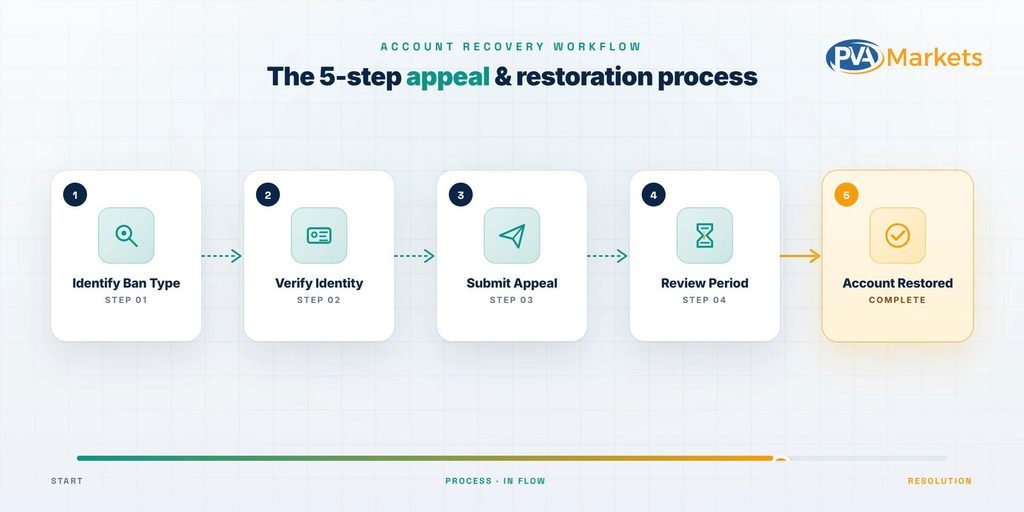
The primary way to recover a disabled Instagram account is to request a review through Instagram’s official process when available.
The steps below follow the general approach described in Instagram’s disabled-account Help Center guidance.
Step 1: Identify Your Suspension Type
Open the Instagram app and try signing in to the affected account.
Read the message in full. Pay attention to whether Instagram says the account is suspended, disabled, restricted, or requires verification.
If a deadline appears, record the date.
Save a screenshot that shows the message and any available options.
Next, choose the process that matches the problem.
| Your situation | Appropriate process |
| Account suspended with a review option | Use the appeal or review option shown |
| Account disabled with review instructions | Follow Instagram’s disabled-account process |
| Account hacked or taken over | Use Instagram’s hacked-account recovery process |
| Account asks for identity verification | Complete the requested verification |
| Account login fails without a suspension message | Troubleshoot login and recovery details |
This prevents a common mistake: using a hacked-account process to address a policy decision, or attempting a policy appeal when the actual issue is a forgotten password.
Step 2: Use the Official Appeal Option
If Instagram offers an option to appeal or dispute a suspension, use it.
The general steps are:
- Open the official Instagram app.
- Enter the username and password for the affected account.
- Read the suspension or disabled-account notice.
- Select the available appeal, review, or disagreement option.
- Follow the instructions on the screen.
- Submit the information Instagram requests.
The wording and screens may vary by account and enforcement action.
Do not assume that every account has access to the same appeal form.
Instagram’s official guidance tells users who believe their account was disabled by mistake to open the app, sign in, and follow the on-screen instructions to request a review.
Important: If your notice shows an appeal deadline, follow that deadline rather than relying on recovery timelines published by third-party websites.
Step 3: Complete Verification if Required
Instagram may require you to verify your identity before it can resolve an account access issue.
The verification method depends on the situation.
Instagram might ask you to confirm an email address, enter a security code, provide identity information, or complete a video selfie check.
For a video selfie, Instagram may ask you to turn your head in different directions to confirm that you are a real person.
Meta’s official documentation says this specific video selfie review may take up to two business days. That estimate applies to the documented video-selfie process, not to every Instagram suspension appeal.
If Instagram accepts your video selfie, it may send recovery instructions to the secure email address you provided.
Only submit sensitive information through Instagram’s official app or verified Meta-owned pages.
If you no longer control your linked email, try recovering that email account first. Instagram’s Help Center explains that account recovery options may be limited when users lose access to their registered email address or phone number.
Source: Lost access to an Instagram email address or phone number.
Step 4: Write a Factual Appeal
Some appeal processes allow you to explain why you disagree with the decision.
If Instagram provides a text field, keep the explanation short and accurate.
Include your username, the suspension date if you know it, and why you want Instagram to review the decision.
Do not claim the account was hacked unless you have a basis for believing that happened.
You can adapt this example:
SAMPLE INSTAGRAM APPEAL
Hello Instagram Support,
I’m requesting a review of the suspension of my Instagram account, @yourusername.
I noticed the suspension on [date]. I believe Instagram may have made this decision in error because [brief factual explanation].
I own and manage this account and can provide the requested verification details. Please review the suspension and let me know if more information is needed.
Thank you.
If someone accessed your account without permission, explain that instead of using the general example.
For instance:
“I suspect someone accessed my account without permission before the suspension. I noticed an unauthorized change to my account email on September 12. I would like to verify ownership and request a review.”
Only use a statement like this if it matches what happened.
An appeal template cannot guarantee recovery. The decision depends on Instagram’s review and the account’s circumstances.
Step 5: Follow Your Appeal Status
After submitting the appeal, save any confirmation shown in the app.
Check the email address linked to your Instagram account and watch for further requests.
If Instagram provides a review status, follow it through the app.
If you can still access account settings, check Instagram Account Status for available information about removed content, feature restrictions, or review options.
You can find Account Status in your profile settings; menu names may vary by app version.
Account Status is not a universal tracker for every suspended-account appeal. Some disabled users cannot access this section at all.
There is no universally applicable review deadline for Instagram suspension appeals.
Avoid submitting duplicate requests unless Instagram offers an alternative review option or asks you to provide additional information.
Also, avoid paying someone who claims they can bypass Instagram’s internal review process.
What if your Instagram account was hacked before suspension?
If you suspect an account takeover, the case requires additional steps.
Visit instagram.com/hacked and select the option that best describes the problem.
You should also secure the email address linked to Instagram, change any compromised passwords, and review other connected accounts.
If Instagram asks for identity verification, complete it through the official process.
A hacked account and a policy suspension can occur together. Recovering access does not guarantee that Instagram will reverse every enforcement decision.
If your business uses Instagram for customer support, document any unauthorized account changes and warn your customers through communication channels that you still control.
Instagram Account Suspended for 180 Days: What Does It Mean?
Some Instagram users see a message stating that they have 180 days to appeal a suspension.
The key distinction is between the time allowed to submit an appeal and the length of a suspension.
They are not the same thing.

A notice that gives you 180 days to appeal generally sets a deadline for requesting a review. It does not promise that Instagram will restore your account after 180 days.
It also does not mean you must wait 180 days before appealing.
Does Instagram suspend accounts for 180 days?
Do not interpret a 180-day appeal notice as a standard 180-day temporary suspension.
For example, suppose Instagram suspends your account on October 1 and gives you 180 days to appeal.
That notice does not guarantee that Instagram will reactivate your account 180 days later.
Instead, it means you should act within the appeal period displayed for your account.
The exact deadline shown by Instagram takes priority over general advice.
Can you recover an Instagram account before 180 days?
You may be able to recover the account if Instagram reviews your appeal and reverses its decision.
There is no rule stating that a successful appeal must take a certain number of days.
To protect your available options:
- Submit the appeal before the displayed deadline.
- Complete all requested verification.
- Keep your linked recovery email accessible.
- Save confirmation of your submission.
- Follow any further instructions issued by Instagram.
What happens if the 180-day appeal period expires?
If Instagram states that the account will be permanently disabled after the deadline, missing it may end the normal appeal period.
Do not assume that support can reopen an expired appeal.
Some online guides claim that special forms or paid services can always restore accounts after the deadline. There is no verified universal process that supports that claim.
Verification limitation: The official disabled-account guidance supports using the review process shown in the app, but the accessible official sources reviewed for this article did not establish a universal 180-day appeal period for every suspension.
Use the date and instructions displayed in your own Instagram notice.
What Happens When an Instagram Appeal Is Rejected?
If Instagram rejects your appeal, the suspension may remain in effect.
The next step depends on what Instagram tells you.
Some users receive a final decision. Others may receive instructions to provide more information or complete another verification step.
Instagram does not offer another appeal for every account.
If Instagram says the decision is final
Read the message carefully.
If Instagram says its decision is final, do not assume that submitting the same information through unrelated forms will change the result.
Save the decision and any case reference provided.
If you believe your account was compromised, check whether Instagram offers a separate recovery process for unauthorized access.
That process addresses account ownership and security. It does not guarantee reversal of a final policy decision.
What if the appeal button is missing?
First, determine whether the account is actually suspended.
Try signing in through the official app and check the error message.
If you are unable to log in but do not see a suspension notice, follow Instagram’s login troubleshooting instructions.
If Instagram confirms the account is disabled but does not offer a review option, the account may not have another in-app appeal path.
Do not use third-party websites that claim to offer a hidden or guaranteed appeal form.
You can consult the Instagram Help Center to check whether any official instructions apply to your situation.
Can Meta support help with a rejected appeal?
Some users and businesses have access to additional support options through eligible Meta services.
However, support access varies by account and product.
Having a business account, running advertisements, or paying for a service does not guarantee that Meta will reverse an Instagram suspension.
If your account has access to an official Meta support channel, you can describe the issue and provide the requested case details.
Keep these two points separate:
- Access to support means you may be able to submit a problem or discuss it.
- Access to support does not mean Meta will overturn a rejected suspension.
Avoid claims that spending a small amount on Meta ads automatically unlocks recovery support. This is not an established recovery method.
Instagram Account Suspended for Being Associated With Another Account
Some users receive a suspension notice referencing an account associated with another account.
This situation requires careful attention because it may involve account integrity rules rather than a problem with your visible posts.
What does an associated-account suspension mean?
A notice referencing an associated account suggests that Instagram has identified a relationship between the affected account and another account relevant to an enforcement decision.
That does not reveal exactly how Instagram established the relationship.
Meta maintains policies about authentic identities, deceptive behavior, and attempts to evade enforcement.
However, a broad account-integrity policy does not prove which technical method Instagram used in an individual case.
For example, an agency may manage Instagram profiles for several clients.
If Instagram suspends one client’s account, that does not mean it must suspend every profile the agency manages.
Likewise, two family members using the same internet connection does not prove either account violated Instagram’s rules.
How should you appeal an associated-account suspension?
Start with the notice itself.
If Instagram provides an appeal, explain your relationship to the account and why you believe the decision needs review.
Relevant details might include:
- Who owns and manages the affected account?
- Whether it represents a separate person or business.
- Whether another person had account access.
- Whether the account was compromised.
- Whether the account was used to evade an existing suspension.
For example, if you own a legitimate business profile that has separate management and content from another suspended profile, you can explain those facts.
Do not make claims about device fingerprints, IP addresses, or internal detection systems unless Instagram has given you specific information.
Most importantly, do not try to circumvent an active enforcement decision by creating replacement accounts intended to evade it.
Use the official review process to resolve the original issue.
How Long Does an Instagram Suspension Last?
There is no single suspension length that applies to every Instagram enforcement action.
The outcome depends on the type of restriction, the account’s situation, and whether Instagram reverses its decision.
| Account status | How long it may last | What determines the next step |
| Feature or action restriction | Until the restriction is lifted | The message and any displayed end date |
| Security verification | Until the required recovery or verification step is completed, if accepted | Identity and account access checks |
| Suspended account under review | No universal published review time | Instagram’s review outcome |
| Disabled account | May remain disabled unless a review changes the decision | Eligibility and appeal outcome |
| Permanently disabled account | May remain inaccessible indefinitely | Whether any further review is available |
| Deleted account | Not the same as suspension | Deletion status and official recovery rules |
Will Instagram automatically unsuspend my account?
Not necessarily.
Some limited restrictions may expire without a full account appeal.
A disabled account may require a review and a decision from Instagram.
If the notice asks you to appeal, do not rely on waiting for an automatic restoration.
How can you tell whether a suspension is permanent?
Check whether Instagram offers further review or explicitly states that the account is permanently disabled.
A message saying you have a deadline to appeal is different from one saying Instagram has made a final decision.
If the wording is unclear, follow the available in-app instructions.
Do not treat third-party estimates as a substitute for your account’s actual status.
How to Avoid Instagram Account Suspensions
No prevention method guarantees that Instagram will never restrict an account.
However, users and businesses can reduce avoidable policy and security risks.
Follow Instagram’s Community Guidelines
Review the rules before publishing content that could raise concerns about harassment, prohibited material, impersonation, or intellectual property.
For businesses, this also means reviewing the behavior of agencies and contractors who publish on your behalf.
A company remains exposed to account disruption when someone managing its profile engages in prohibited activity.
Avoid fake engagement and spam.
Do not buy fake likes or followers, post repeated spam comments, or use automated systems to send unsolicited messages.
Focus on genuine activity and relevant interactions.
Do not rely on claims that staying below a certain number of likes, follows, or messages per day will make automation safe. Instagram does not publish a universal limit that guarantees protection from suspension.
Review connected apps and services.
Check which services have access to your Instagram account.
Remove access from tools you no longer need or do not recognize.
Use established integrations that follow Instagram’s authorized access methods.
Be careful when a service asks for your account password instead of using an official authorization process.
Secure your account
Use a strong, unique password and enable two-factor authentication.
Protect the email address connected to your Instagram profile.
Review login alerts and remove unfamiliar sessions when account settings allow it.
For business accounts, limit access to staff who need it and remove access when a team member leaves.
Check Instagram Account Status
If you can log in, review Account Status for available warnings and restrictions.
Depending on the account and app version, Account Status may provide information about removed content or features that Instagram has limited.
If a review option appears, follow the instructions shown.
Do not assume that a clean Account Status screen guarantees immunity from future enforcement.
Keep business recovery information current.
Businesses and creators should maintain current contact details and ownership records.
Keep copies of important content, marketing assets, and business records outside Instagram.
If your Instagram profile becomes unavailable, those records may help you maintain business operations and provide context for a legitimate support request.
They do not guarantee that Instagram will restore the account.
What to Check Before Managing Another Instagram Account
If you manage multiple Instagram accounts for personal or business use, review each account’s security settings, ownership details, and compliance with Instagram’s policies.
Before taking control of an existing account, confirm that you have legitimate access and understand the risks. Account transfers may violate Instagram’s Terms of Use, and an account’s past activity can create problems for its new operator.
For readers researching different account options, PVAMarkets maintains an Instagram account catalog. However, purchasing another account is not a way to recover a suspended profile or bypass Instagram’s enforcement decisions.
Frequently Asked Questions
1. How do I get Instagram to unsuspend my account?
Open the Instagram app, sign in, and follow the appeal or review instructions shown in the suspension notice. Complete any required verification. If you believe the account was hacked, use Instagram’s official hacked-account recovery process.
2. Why was my Instagram account suddenly suspended?
Possible reasons include Community Guidelines violations, spam, prohibited automation, identity concerns, or an account compromise. An unexpected suspension may also be due to an error. The exact reason cannot be confirmed without information from Instagram.
3. What happens if you get your Instagram account suspended?
You may lose access to your profile and account features. Other users may be unable to view the account. Instagram may offer an appeal or verification process, depending on the suspension.
4. How long does your Instagram get suspended for?
There is no universal suspension period. Some restrictions have an expiration date, while disabled accounts may require an appeal. A 180-day appeal deadline does not mean the account will reactivate after 180 days.
5. Can a permanently suspended account be recovered?
A permanent suspension may be final. If Instagram still offers an official review and reverses its decision, it may restore access. If the decision is final and no further review is offered, recovery may not be available.
6. What if Instagram rejects my appeal?
Read the decision and check whether Instagram offers another review or verification step. If no further review is available, do not assume that unofficial recovery services can overturn the decision.
7. Can an associated account trigger suspension?
An Instagram notice may refer to an associated account, including in cases involving account integrity concerns. The notice does not establish which technical signals Instagram used. If you believe the association is incorrect, explain the facts through the official appeal process.
8. Can I recover an account after an appeal deadline?
You should not assume you can. If Instagram’s appeal deadline has passed and the decision is final, standard review options may no longer be available. Check the account notice for any remaining official instructions.
Final Thoughts
If Instagram has suspended your account, first identify the restriction and read the message Instagram shows during login.
Use Instagram’s official appeal option if one is available. Complete any identity checks, keep your information accurate, and follow the deadline shown in your notice.
If the account was compromised, use Instagram’s hacked-account recovery process. If an appeal is rejected, check whether Instagram offers another review rather than relying on unofficial recovery claims.
Instagram may restore some accounts, but it does not guarantee recovery. The outcome depends on the circumstances and Instagram’s final decision.
For the most reliable instructions, refer to the official Instagram Help Center and Instagram Community Guidelines.