
How to Remove Bot Followers on Instagram After Someone Bought Fake Followers for Your Account
Someone checks Instagram and suddenly sees hundreds or thousands of new followers. The account was previously organic, but now it is flooded with fake profiles, spam requests, copied comments, and bot activity.
This can happen when someone buys fake followers for your account without permission, or when a bot network targets your profile. The goal may be to damage your engagement rate, make your account look suspicious, or trigger spam signals.
Why Did My Instagram Suddenly Get Thousands of Bot Followers?
- Someone bought fake followers for your account
- Your profile was scraped by a bot network
- A viral post attracted spam accounts
- Your account was targeted by harassment bots
- Public business accounts are easier for bots to follow
You may not be able to prove who did it unless there is direct evidence.
Can Fake Followers Get Your Instagram Account Removed?
Fake followers alone usually do not mean your account will be removed. The bigger risks are spam comments, fake engagement, mass reports, suspicious login activity, and policy violations connected to your account.
Do not buy followers yourself, do not use third-party follower-removal apps, and do not give login access to unknown tools.
Step 1 — Make Your Account Private Temporarily
If the fake followers are still coming in, switching to private helps stop new bot accounts from following automatically.
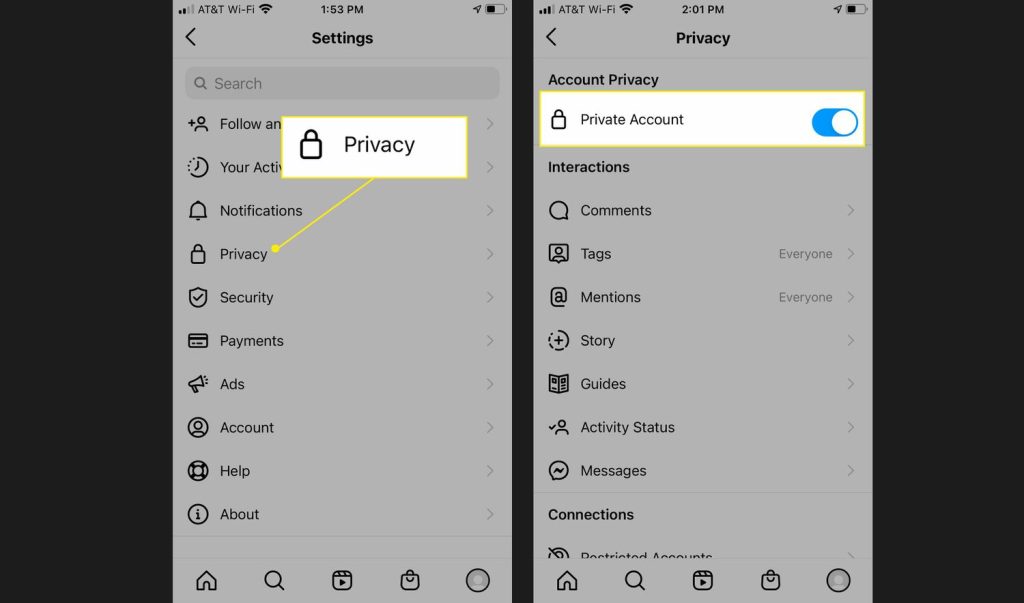
- Go to Instagram settings
- Open account privacy
- Turn on private account
- Review follow requests
- Delete suspicious requests in bulk if available
Instagram’s Help Center confirms that users can manage unwanted followers and review flagged follow requests from suspicious accounts.
Step 2 — Remove Bot Followers Manually
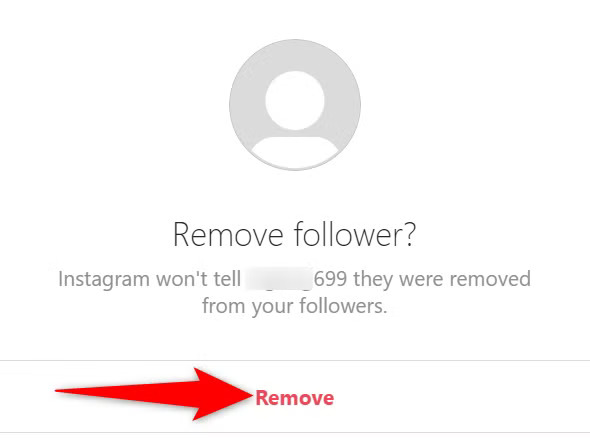
Instagram does not always provide a perfect one-click cleanup for thousands of existing bot followers. Manual removal may still be required.
- No profile photo
- Random usernames
- No posts
- Following thousands of people
- Generic comments
- Foreign spam bio links
- Repeated copy-paste comments
Remove followers slowly. Mass actions may trigger temporary limits.
Step 3 — Use Instagram’s Spam or Flagged Account Tools
Instagram may detect suspicious followers and place them in a flagged or spam-related section depending on account type, region, and app version.
- Check the followers list
- Look for flagged accounts
- Review suggested spam followers
- Remove them in batches when possible
Step 4 — Turn Off or Limit Comments Temporarily
If bots are leaving thousands of hate or spam comments, removing followers is not the first priority. The first priority is stopping public damage.
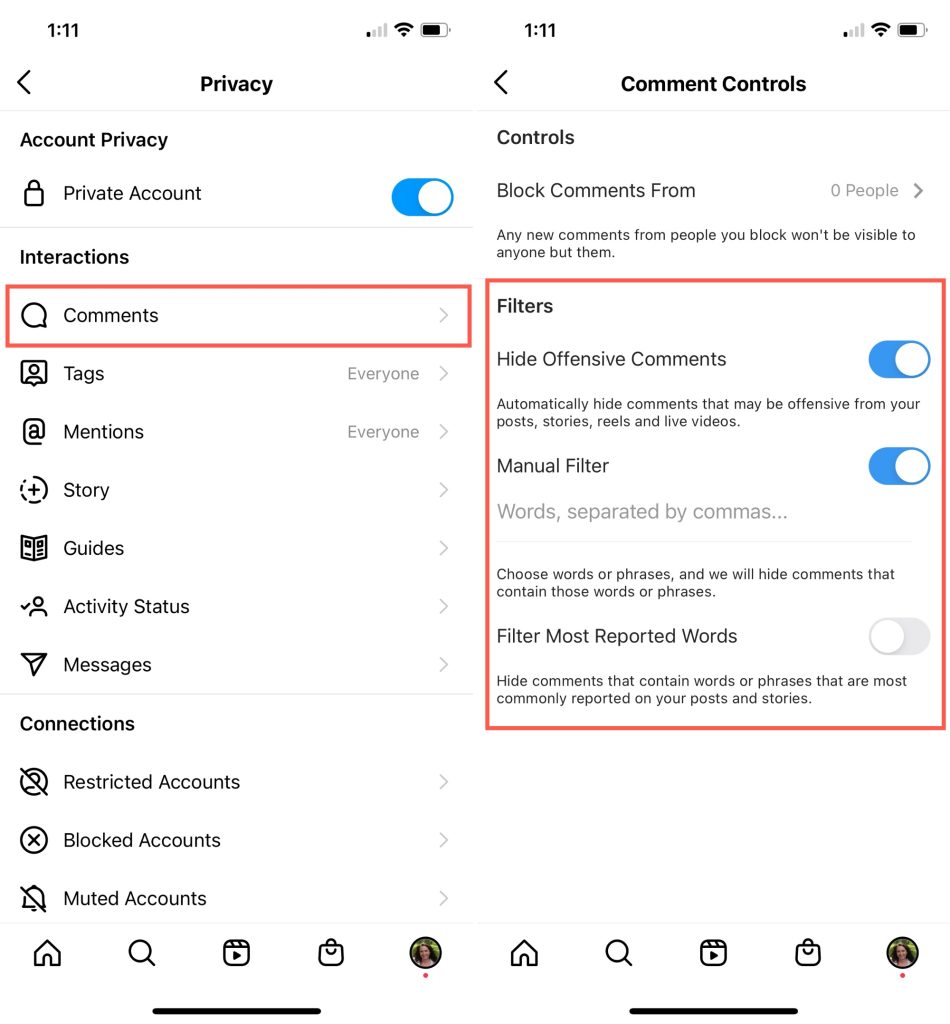
- Turn off comments on affected posts
- Limit comments to people you follow or followers you trust
- Use Hidden Words
- Add common spam phrases to filtered words
- Hide offensive or repeated comments
Instagram provides comment and message filtering tools through Hidden Words and related safety settings.
Step 5 — Report the Spam Accounts and Comments
Reporting every bot may be unrealistic if there are thousands, but report samples of the worst accounts and comments.
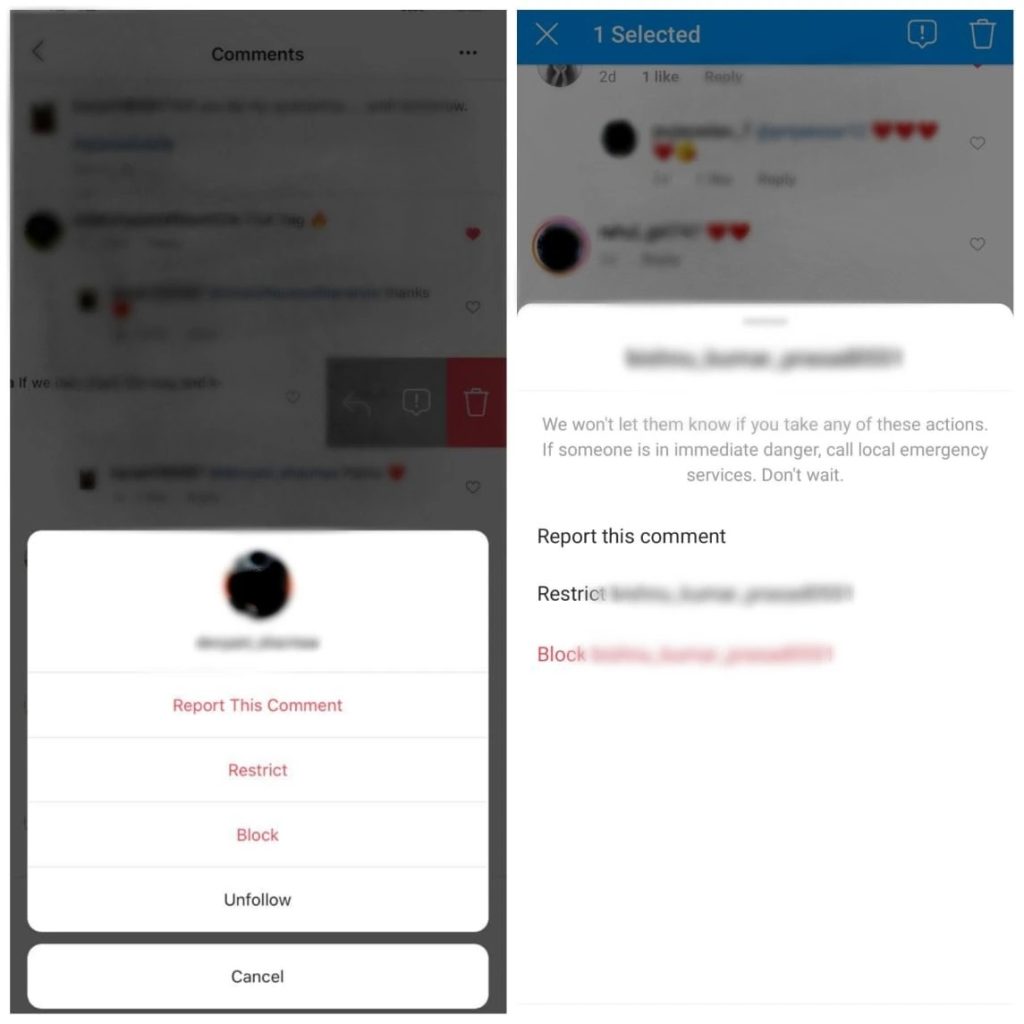
- Report spam profiles
- Report abusive comments
- Report harassment if comments are targeted
- Take screenshots before deleting anything
Instagram recommends using the report option for abusive content, spam, comments, posts, and profiles.
Step 6 — Secure Your Instagram Account
A fake follower attack does not always mean your account was hacked, but you should still secure it.
- Change your password
- Turn on two-factor authentication
- Remove suspicious third-party apps
- Check login activity
- Update your email and phone number
- Avoid follower cleaner apps asking for login access
Step 7 — Do Not Use Fake Follower Removal Apps Without Checking Them
Many apps that promise to remove ghost followers require Instagram login access. That creates a separate risk: account compromise, automation flags, or data theft.
If the tool is not trusted, do not use it.
Step 8 — Should You Delete Your Instagram Account and Start Over?
Usually, no.
If the account has personal history, organic followers, old content, and business value, deleting it should be the last option.
Keep the account if:
- You still have access
- Your real followers are still there
- Your posts are safe
- You can control comments
- The bot activity has slowed down
Consider starting fresh only if:
- The account is repeatedly restricted
- You cannot remove the spam
- Your real audience is gone
- The account is permanently damaged for business use
How Long Does It Take to Clean Bot Followers?
- A few hundred bots: same day
- A few thousand bots: several days
- 10,000+ bots: may take weeks manually
- If Instagram detects them: cleanup may be faster
The goal is not instant perfection. The goal is to stop new spam, protect the account, and clean gradually.
How to Prevent Bot Followers in the Future
- Keep comments filtered
- Avoid public giveaways that attract spam
- Do not use engagement pods
- Do not buy followers
- Monitor follower spikes
- Keep account security strong
- Review suspicious followers weekly
Final Advice
If someone bought fake followers for your Instagram account, do not panic-delete the account. First, make it private, stop comments, report the spam, secure your account, and remove bots gradually.
The problem is annoying, but it is manageable if you stop the bot activity first and clean the account in batches.
FAQ Section
Can someone buy fake followers for my Instagram account?
Yes. Some fake follower services only need a public username.
Will Instagram ban me if someone else bought fake followers?
Not automatically, but fake activity can create risk if it looks connected to spam, automation, or policy abuse.
Can I remove all bot followers at once?
Sometimes Instagram shows flagged accounts you can review, but many users still need to remove followers manually.
Should I make my Instagram private after a bot attack?
Yes, temporarily. It helps stop new bot followers while you clean the account.
Should I delete my account?
Usually no. Try cleanup and protection first, especially if the account has real history and organic followers.