
How Do You Find Out Who Owns a Gmail Account? What You Can and Cannot Verify
If you are trying to work out how do you find out who owns a Gmail account, the first thing to know is that Google does not provide a public directory that reveals the legal owner of a Gmail address.
You may be able to identify useful clues, such as a display name, profile photo, public profiles, business references, or other information the user has chosen to make public. But those clues do not always prove who created or controls the account.
Google Account settings let users decide what personal information appears across Google services, including their name, profile photo, employment information, and contact details. Some information can be public, while other details remain private.
So the realistic goal is not to “trace” every Gmail account.
The goal is to determine what can be verified from public or voluntarily shared information, how reliable each clue is, and when you should stop because the identity cannot be confirmed.
Can You Find Out Who Owns a Gmail Account?
Sometimes you can identify the person or business associated with an address.
But you usually cannot prove ownership from the Gmail address alone.
Google does not provide a public Gmail owner lookup. Google Help Community responses consistently state that there is no public method to find who originally created a Gmail address or where the account was created.
That means these are different questions:
- Who appears to use this Gmail address?
- What name is attached to the Google profile?
- Has this email address been published online?
- Is it connected to a business or public profile?
- Who legally created or controls the Google Account?
The first four may sometimes be answered.
The last one usually cannot be confirmed without access to information held by Google or another account owner.
What Information Can Google Show About a Gmail User?
Google lets users control what others can see across Google services, including profile details, contact information, and other information they choose to make visible.
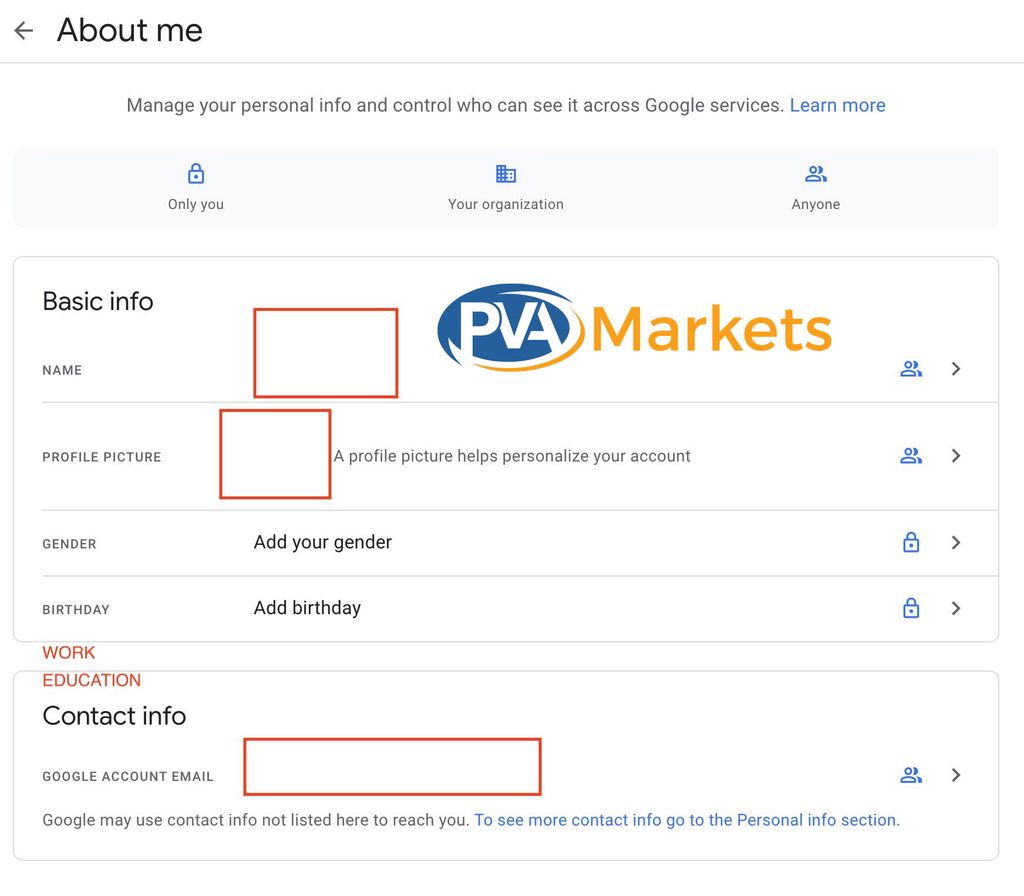
Depending on the user’s privacy settings and whether you have interacted with them, you may see:
- their Google Account name;
- profile picture;
- nickname;
- Google Account email address;
- employment information;
- education information;
- contact details;
- other information they chose to make visible.
Google also has a feature called Profile Discovery. When enabled, it can allow people who have someone’s email address or phone number to see the person’s full or abbreviated name and profile picture in supported Google services.
However, this information should be treated as a clue, not proof.
A Google Account name can be changed. A profile picture can be inaccurate. A Gmail address may be shared or controlled by someone other than the person named on the profile.
1. Check the Name and Profile Photo Attached to the Gmail Address
The simplest place to start is the information Google itself shows.
If you received an email from the address, look at:
- the sender name;
- the profile image;
- the email signature;
- any company name;
- any website or social links in the message.
You may also see the person’s Google Account name or profile image when interacting with them through Google services.
Google states that people using its services may be able to see a user’s name and profile picture. What appears depends on the account holder’s privacy settings and interaction history.
How Reliable Is This?
Reliability: Low to medium
A profile name can be useful if it matches other public information.
It should not be treated as identity proof on its own.
For example:
john.smith2026@gmail.com
with the display name:
John Smith
does not prove that John Smith legally owns or created the account.
It only tells you that the account currently presents that name.
2. Search the Full Gmail Address on Google
A public web search is often more useful than the Gmail username itself.
Search the full address inside quotation marks:
"example@gmail.com"
Quotation marks ask Google to look for pages containing that exact text.
If the Gmail address has been published publicly, you may find it on:
- company contact pages;
- portfolio sites;
- forum posts;
- professional profiles;
- public directories;
- author pages;
- old blog posts;
- GitHub or developer pages;
- event pages;
- public documents.
This method works best when the person has reused the same email publicly for years.
It works poorly when the Gmail account is new, private, or created for a single purpose.
How Reliable Is This?
Reliability: Medium when multiple sources match
One page containing an address is not always enough.
Look for consistency.
For example, if the same Gmail address appears on:
- a portfolio;
- a LinkedIn profile;
- a business website; and
- a public author page
under the same person’s name, the connection becomes stronger.
But it still proves that the email was publicly associated with that person, not necessarily who originally created the Google Account.
3. Search the Gmail Username Separately
The part before @gmail.com may be reused elsewhere.
For example:
alexmartin82@gmail.com
has the username:
alexmartin82
Search:
"alexmartin82"
You may find the same username on:
- social networks;
- forums;
- developer communities;
- gaming platforms;
- personal sites;
- online marketplaces.
This can help when the full email address was never published.
Be Careful With Common Usernames
A username match alone is weak evidence.
Two unrelated people can use the same username on different platforms.
The result becomes more useful when several details also match, such as:
- name;
- profile photo;
- location;
- employer;
- website;
- writing style;
- other contact details.
How Reliable Is This?
Reliability: Low to medium
Use username matching as supporting evidence, not as the final answer.
4. Check Public Google Profiles and Activity
Some Google Account information may appear in Google services when the account holder has made it visible.
Google says information made visible to “Anyone” can appear in services such as:
- Gmail;
- Google Chat;
- Maps;
- Play;
- YouTube.
Public information may include a name, photo, employment information, education details, or other profile data.
This creates another possible source of clues.
For example, the same profile image or name may appear across a Google profile and a public YouTube channel.
Do Not Assume Public Google Activity Proves Ownership
Someone can use:
- a nickname;
- a brand name;
- an outdated photo;
- a business identity;
- a shared account.
Treat the information as another data point.
5. Read the Email Itself Carefully
If the Gmail address contacted you, the message may reveal more than the address.
Check:
- the sender’s signature;
- company name;
- phone number;
- job title;
- website;
- social profile links;
- invoice information;
- booking details;
- references to organizations or projects;
- writing context.
For business email, the message itself may give enough information to verify the sender independently.
For example, imagine someone emails you from:
tommarketing@gmail.com
and claims to work for a specific agency.
Instead of trusting the Gmail address, visit the agency’s official website and check whether the person appears on the team page.
If necessary, contact the company through an independently verified phone number or website.
This is often more reliable than trying to identify the Gmail account directly.
6. Verify a Business Claim Through an Independent Source
If the sender claims to represent a company, do not use information from the email alone.
Verify it separately.
You can check:
- the company’s official website;
- public staff pages;
- company LinkedIn pages;
- verified social profiles;
- government business registries where appropriate;
- official contact information.
Suppose a sender claims:
“I work for ABC Software.”
The strongest check is not whether the Gmail name matches.
It is whether ABC Software independently confirms that the person works there or uses that address.
How Reliable Is This?
Reliability: High when the organization independently confirms it
This is one of the better methods for business-related Gmail accounts.
7. Ask the Person Directly
This is the simplest method and often the most overlooked.
If the situation is legitimate, send a short message asking who they are and why they contacted you.
A Google Help Community answer to a question about identifying a Gmail account owner states that asking the address directly is essentially the only public option when no other information is available.
Of course, the person can provide false information.
So if the identity matters, verify their answer through an independent source.
8. Use Reverse Email Lookup Services Carefully
Several websites advertise reverse email lookup services.
They may claim to find:
- names;
- social profiles;
- usernames;
- phone numbers;
- addresses;
- business records;
- public database matches.
These tools can sometimes find useful public information.
But there are three important problems.
Results May Be Wrong
Databases can contain:
- outdated information;
- merged records;
- recycled email addresses;
- false matches;
- scraped data;
- unrelated people with similar names.
A result should never be treated as proof simply because a lookup site displays it.
Coverage Is Uneven
A Gmail address that has existed publicly for ten years may return many results.
A private or recently created address may return nothing.
Privacy Matters
Do not use these services to harass, threaten, impersonate, stalk, or expose private individuals.
For routine identity checks, public and independently verifiable sources are better evidence than a single data-broker result.
What About Email Headers?
Gmail also lets users view the full email header, which can help inspect message routing and authentication.
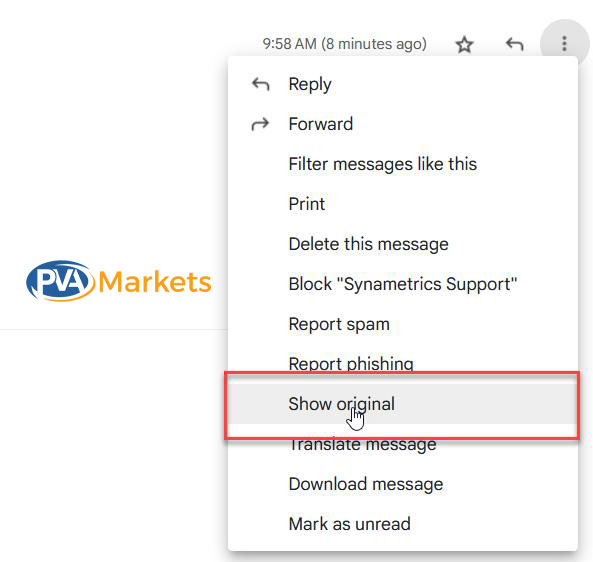
Email headers can help answer a different question:
Did this message pass through the servers it claims to use?
Headers may include information about:
- sending servers;
- authentication;
- routing;
- timestamps;
- SPF;
- DKIM;
- DMARC;
- Reply-To addresses.
This is useful when checking suspicious email.
But Gmail headers do not provide a simple public field saying:
“This Gmail account belongs to John Smith at this home address.”
For consumer Gmail messages, the header information should be used mainly to inspect message routing and authentication, not to identify the legal owner.
Can You Find Someone’s Location From a Gmail Address?
Not reliably from the Gmail address itself.
A Gmail address does not publicly expose the user’s home address or current physical location.
You might find a city or country if the person has published that information elsewhere.
For example, a public profile might say:
Chicago, Illinois
That only means the person chose to publish that location.
It does not prove where the person currently is.
Avoid websites that claim a Gmail address alone can reveal an exact live location.
Can Google Tell You Who Owns a Gmail Account?
Not through a normal public lookup request.
Google’s Privacy Policy explains that personal information may be disclosed in limited legal situations, such as valid legal process or enforceable government requests.
Google’s privacy policy explains that personal information may be disclosed in specific legal situations, including valid legal processes and enforceable government requests. Google also documents how government agencies may request subscriber or account information through legal procedures.
That process is different from a member of the public contacting Google and asking:
“Who owns this Gmail address?”
Google does not offer a public directory for that purpose.
Can You Find Out Where a Gmail Account Was Created?
Not through a normal public lookup.
A Google Account Help Community question specifically asked whether it was possible to determine where a Gmail account was created and by whom. The recommended response stated that this was not publicly possible.
You may find public clues about where a person lives or works.
That is not the same as knowing where the Google Account was originally created.
Can the Display Name Prove Who Owns the Gmail Account?
No.
A display name is one of the weakest forms of identity evidence.
Google allows users to change their Google Account name. Google also notes that older messages may keep a name that was used when the message was originally sent.
A display name should therefore be treated as:
a clue, not verification.
For stronger verification, look for independent evidence connecting the same email address to the same person or organization.
How Reliable Are the Different Methods?
| Method | What it may show | Reliability |
|---|---|---|
| Gmail display name | Name chosen for the account | Low |
| Profile photo | Image associated with the profile | Low |
| Email signature | Claimed identity or company | Low to medium |
| Exact email Google search | Public pages containing the address | Medium |
| Username search | Accounts using similar username | Low to medium |
| Multiple matching public profiles | Consistent identity clues | Medium to high |
| Official company confirmation | Whether sender represents the company | High |
| Reverse email lookup | Database and public-record matches | Varies |
| Asking the sender | Self-reported identity | Medium until verified |
| Google public owner lookup | Not available | None |
The safest approach is to combine several independent sources.
Red Flags That the Gmail Sender May Not Be Who They Claim
Sometimes the real question is not “Who owns this Gmail account?”
It is:
“Can I trust this sender?”
Watch for signs such as:
- the sender claims to represent a company but uses an unrelated personal Gmail address;
- the name does not match the company staff page;
- the sender refuses independent verification;
- the email requests passwords or verification codes;
- the sender asks for urgent payment;
- the Reply-To address differs from the visible sender;
- the sender asks you to move immediately to another messaging platform;
- links point to unrelated domains;
- the message creates artificial urgency.
In those cases, verifying the sender’s claim matters more than finding the original account creator.
What Should You Not Do?
There are several approaches you should avoid.
Do Not Try to Access the Account
Do not attempt to guess passwords, bypass authentication, intercept login codes, or gain unauthorized access.
That does not verify ownership. It creates a separate security and legal problem.
Do Not Use Password-Reset Screens as a Lookup Tool
Account recovery systems exist to help legitimate account owners recover access.
They should not be used to probe private information about someone else’s account.
Do Not Assume a Reverse Lookup Result Is Correct
One database match is not enough to establish identity.
Cross-check important findings.
Do Not Publish Personal Information Just Because You Found It
Finding something online does not automatically make it appropriate to republish.
Use identity checks for legitimate verification, fraud prevention, security, or business due diligence.
A Better Way to Check an Unknown Gmail Address
If you need a simple process, use this order:
Step 1: Check the sender information
Look at the name, profile image, email signature, and message context.
Step 2: Search the exact address
Put the full Gmail address in quotation marks.
Step 3: Search the username
Check whether the same username appears elsewhere.
Step 4: Compare public information
Look for consistent names, photos, companies, websites, or other details.
Step 5: Verify business claims independently
Use the company’s real website or official contact information.
Step 6: Ask the sender
If needed, ask them to explain who they are.
Step 7: Stop if you cannot verify the identity
A lack of public information does not prove that the Gmail account is fake.
It may simply mean the owner keeps their account private.
Why Some Gmail Accounts Cannot Be Identified
Some addresses leave almost no public trail.
For example, a person may:
- use a random username;
- hide their profile photo;
- keep Google profile information private;
- never publish the email online;
- use different usernames on other services;
- use the Gmail account only for private communication.
In that situation, there may be no legitimate public method to identify the person conclusively.
That is a normal privacy limitation.
Does an Old Gmail Account Make the Owner Easier to Identify?
Sometimes.
An address used publicly for many years may leave more references across websites, forums, profiles, and archived pages.
But age alone does not prove identity.
An older account could also:
- have changed hands informally;
- be shared;
- use an old display name;
- have been compromised;
- contain outdated public information.
Gmail accounts can also differ by age, profile history, and verification status, which is why it helps to understand the characteristics of different Gmail account types before drawing conclusions from age alone.
So account history can provide context, but it should not replace identity verification.
The Main Difference: Identification vs. Verification
This distinction matters.
Identification means finding information that appears to connect an email address to someone.
Verification means checking whether that information is supported by independent evidence.
For example:
A Gmail profile displays:
Sarah Adams
That is identification.
You then find the same Gmail address on Sarah Adams’ official portfolio, and her company independently lists the same contact information.
That is much stronger verification.
When identity matters, do not stop at the first name you find.
Final Answer
So, how do you find out who owns a Gmail account?
There is no public Google tool that reveals the verified legal owner of a Gmail address.
You can check the Google profile information that the user has chosen to show, search the exact email address and username, review public profiles, inspect the message itself, verify business claims through independent sources, and ask the sender directly.
These methods may help identify who appears to use the address.
They cannot always establish who originally created, legally owns, or currently controls the Google Account.
For important decisions, use several independent sources rather than relying on one display name, profile picture, or reverse email lookup result.
Frequently Asked Questions
Is there a free Gmail owner lookup?
Google does not provide a public Gmail owner directory. Free searches may reveal public information connected to an email address, but they do not guarantee the account owner’s identity.
Can I search a Gmail address on Google?
Yes. Searching the exact email address in quotation marks may reveal websites where the address has been published publicly. A lack of search results does not mean the account is fake.
Can a Gmail profile photo tell me who owns the account?
Not by itself. Google profile photos and account names are controlled by the user and should be treated as identity clues rather than proof.
Can Google give me the Gmail owner’s name?
Google does not provide ordinary users with private account-owner information on request. Google may disclose user information when required by valid legal process.
Can I find where a Gmail account was created?
There is no normal public method for finding where or by whom a Gmail account was originally created.